Grid Tool Drawing: Step-by-Step Tutorial & Easy Ideas
Want to draw a grid tool that actually looks right? Start with light guidelines and build from there. This page covers the full process — nine steps from first line to finished drawing — followed by grid tool drawing ideas in every style: easy, cute, realistic, and a few you probably haven't tried.
- Difficulty Medium
- Time ~20 min
- Tools Pencil, eraser, paper
- Starts with light guidelines
How to Draw a Grid Tool Step by Step
Step 1 of 9
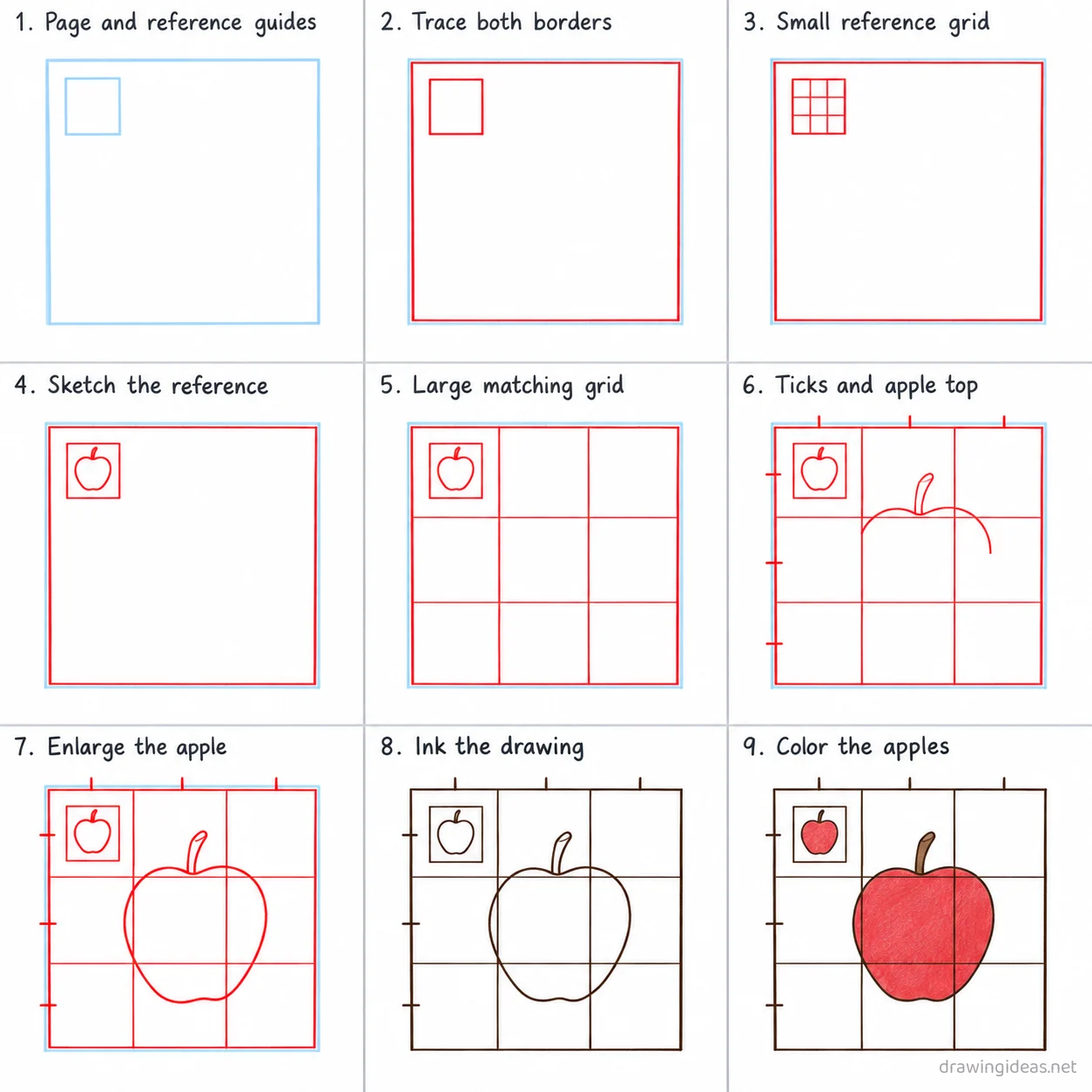
Page and reference guides
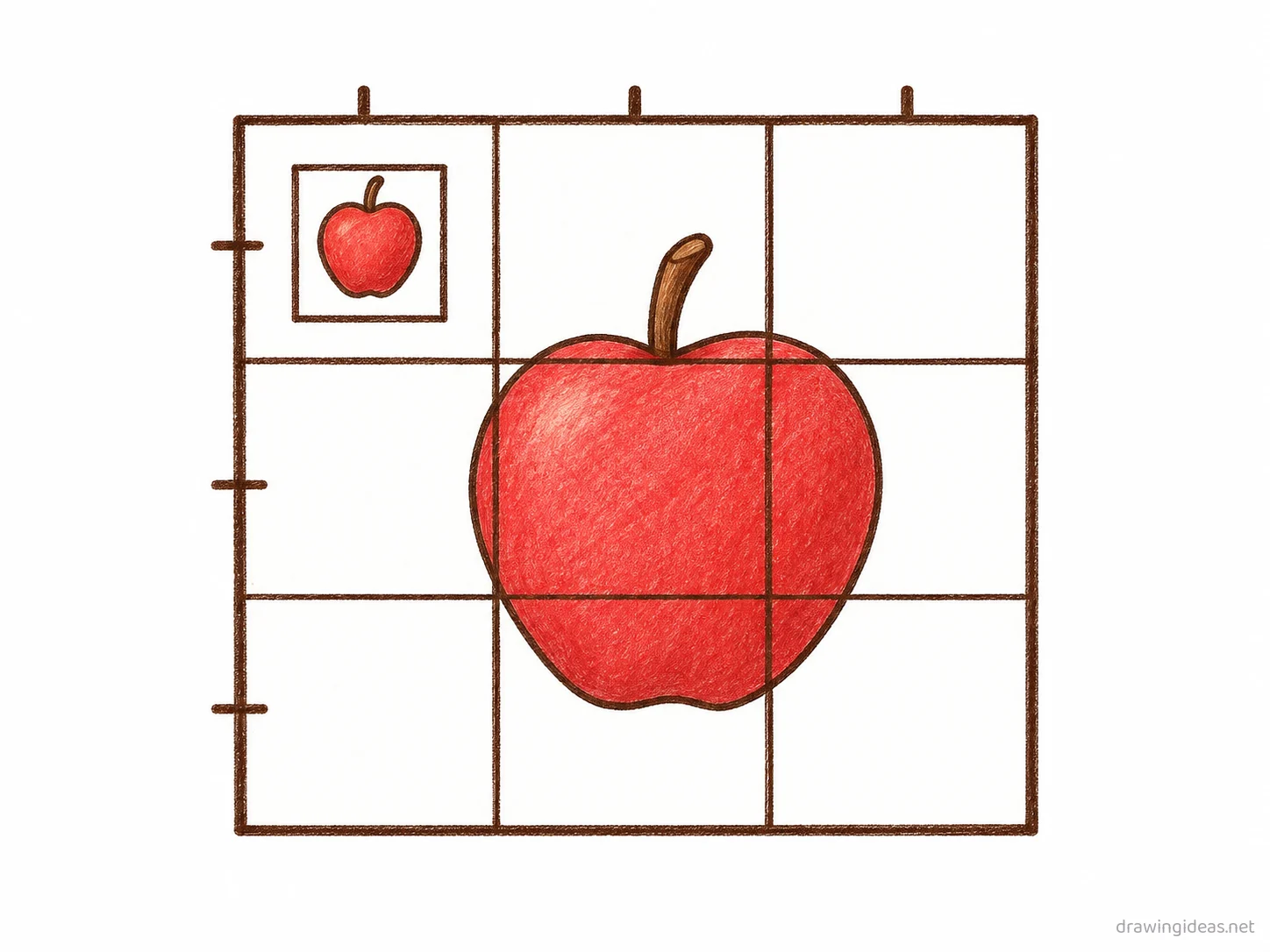
Draw a large light square filling most of the page, then a small light square in its top-left corner for a reference sketch.
-
Page and reference guides
Draw a large light square filling most of the page, then a small light square in its top-left corner for a reference sketch.
-
Trace both borders
Trace the outline of the large page square and the small reference square.
-
Small reference grid
Divide the small reference square into nine equal cells with two vertical and two horizontal lines.
-
Sketch the reference
Draw a small simple apple with a short stem centered inside the reference grid.
-
Large matching grid
Divide the large page square into the same nine equal cells with two vertical and two horizontal lines.
-
Ticks and apple top
Add small tick marks along the left and top edges of the large grid, then copy the upper half of the apple into the matching cells.
-
Enlarge the apple
Continue copying the apple cell by cell into the large grid, drawing the bottom half and then the stem, matching the reference proportions.
-
Ink the drawing
Go over the apple outlines and page borders with dark ink, then erase the light page and reference square guides.
-
Color the apples
Fill both apples bright red, their stems brown, and leave the grid lines and page uncolored.
Grid Tool Drawing Ideas to Try Next
Once the basic grid tool clicks, run it through these variations — each one practices a different skill while staying on a subject you already know.
-
Apply grid tool to a simple still life
Use the technique on a mug and a book from your desk — real objects make practice stick.
-
A practice grid of grid tool studies
Divide the page into six boxes and repeat the exercise with one variation each — visible progress on a single page.
-
A before/after grid tool comparison
Draw the same subject with and without the technique side by side — proof of what you've learned.
-
A timed grid tool challenge
The same exercise at 5 minutes, 1 minute, and 30 seconds — speed reveals what you truly know.
Tips for Better Grid Tool Drawings
- Slow is smooth and smooth is fast: technique practice done deliberately beats ten rushed repetitions.
- Change exactly one variable per repetition — new angle, new size, new subject. That’s how practice compounds into skill.
Not feeling the grid tool today?
Let the generator pick your next subject — filtered by mood and difficulty.
🎲 Random Drawing GeneratorGrid Tool Drawing FAQ
How do you draw a grid tool easily?
Start with light guidelines, keeping your lines light. Refine the outline, add the defining details, then erase the construction shapes. The nine-step method above breaks this down — most people get a recognizable grid tool on their very first try with it.
How long does a grid tool drawing take?
A simple grid tool drawing takes about 20 minutes following this tutorial. A quick doodle version can be done in two or three minutes, while a detailed, fully-shaded study might take an hour. Speed comes with repetition — the second attempt is always faster than the first.
What do I need to draw a grid tool?
Just a pencil, an eraser, and any paper. An HB pencil for construction lines and a 2B for final outlines is a nice upgrade, and colored pencils or markers finish it off — but nothing on this page requires special supplies.
Can kids draw a grid tool?
Yes — the grid tool is very manageable once you use construction shapes, and this method was written for first-timers. Kids can follow the same steps; just expect wobblier lines and more charm.